
You're probably looking at a sales dashboard right now that says your SDRs are “active.” Lots of calls. Lots of emails. Maybe a healthy-looking pile of tasks completed.
And yet pipeline feels soft, forecasts feel squishy, and every deal review turns into interpretive dance.
I've built SDR teams with too many metrics, too few metrics, expensive tools, cheap tools, and one regrettable spreadsheet era I'd like erased from history. The lesson is simple. Sales activity tracking only works when it measures deal progression, not rep busyness.
If your team celebrates 200 dials but can't explain which conversations moved a buyer forward, you don't have visibility. You have noise.
The usual founder move is to track everything because everything feels important. Calls. Emails. Sequences. Tasks. LinkedIn touches. Calendar invites. Probably the rep's caffeine intake if the CRM had a custom field for it.
That's how you end up with a dashboard that appears advanced and tells you nothing.

Here's the part people miss. Sales activity tracking is not a surveillance project. It's a decision system. You're trying to identify which actions consistently create pipeline, advance real opportunities, and lead to closed revenue.
That means raw volume is not the hero.
A rep can send a mountain of emails and still be terrible at creating momentum. Another rep can make fewer calls but book better meetings because they reach the right people, ask sharper questions, and follow up with intent.
That's why I like hard evidence tied to the buyer journey. Research from Superhuman Prospecting states that sales teams who rigorously track activities and align them with the buyer journey see a 15–20% increase in pipeline velocity compared to teams relying on unstructured reporting.
Not because they tracked more stuff. Because they tracked the right stuff.
Practical rule: If a metric can't help you answer “why did this deal move or stall?” it probably doesn't deserve dashboard space.
The trap is thinking more data automatically means more truth. It doesn't. Bad definitions, sloppy logging, and disconnected tools create fake certainty. If you care about reliable input data, it's worth learning how a proactive analytics security system catches broken tracking before your reports turn into fiction.
Most SDR teams need 2–3 critical input metrics at the center of the system, not 17. That lines up with the practical guidance in Method's sales activity tracking framework, which argues for a focused set of key inputs and strong automation instead of drowning reps in admin.
A simple starting point:
That's the whole game. Everything else supports those questions.
The common mistake isn't under-tracking. It's admiring the problem with prettier charts.
You already know your reps are “working hard.” Wonderful. Gold star. The business doesn't get paid for effort theater. It gets paid when reps create movement with the right buyers.
So stop measuring activity like a factory line. Start measuring it like an operating system for revenue. The difference is whether your team learns from the numbers or hides behind them.
It's Monday morning. Your SDR manager walks into the pipeline meeting proud of 1,200 dials, 900 emails, and a dashboard glowing green. Then you ask a simple question. How many deals advanced?
Silence.
That's the trap. Teams praise motion and ignore progress. Then they act surprised when reps burn out, conversion rates sag, and pipeline quality turns into fiction.
If your top SDR KPI is “calls made,” that isn't discipline. It's a scoreboard for busy-work.
Calls, emails, and tasks only matter if they create buying movement. Your tracking system should answer three questions clearly. Are reps getting into real conversations? Are they getting the right people into meetings? Are those meetings turning into opportunities that advance?
I'd run the team on a small set of metrics with teeth:
And yes, if you want outside context, this essential sales productivity benchmarks resource is useful. Use benchmarks to pressure-test your standards, not outsource your judgment.
| The Vanity Metric (What to Avoid) | The Valuable Metric (What to Track Instead) |
|---|---|
| Calls dialed | Talk time with relevant prospects |
| Emails sent | Positive replies from qualified accounts |
| Meetings booked | Meetings booked with stakeholders who can move a deal |
| Tasks completed | Opportunities advanced to the next stage |
| Sequence volume | Conversion across outreach, meeting, opportunity, and stage progression |
That table looks painfully obvious. Plenty of teams still miss it because vanity metrics are easy to collect and easy to celebrate.
Volume-heavy tracking wrecks coaching because it rewards behavior that looks productive from far away. A rep can post huge output numbers while targeting weak-fit accounts, booking soft meetings, and creating pipeline that stalls on contact.
That's why I care more about progression than raw activity. Progression metrics expose message problems, qualification problems, and deal hygiene problems early, while there's still time to fix them.
If you want a broader operating model for that, read this comprehensive startup sales guide. Then cut your KPI list down, not up.
More dials do not fix weak targeting. More emails do not fix a bad message. More activity does not rescue poor qualification.
Pick one conversation metric, one meeting quality metric, and two progression metrics.
That last part matters. One progression metric is usually not enough. I want to know whether a meeting became a real opportunity, and whether that opportunity moved to the next serious stage on time. That combination tells you if reps are creating momentum or just stuffing the CRM with hopeful debris.
Everything else is supporting data. Useful, sometimes. North Star material, no.
Founders love buying software when what they need is discipline. But there is one place I'll spend without much debate. Automating activity capture.
Manual logging is where good intentions go to die.
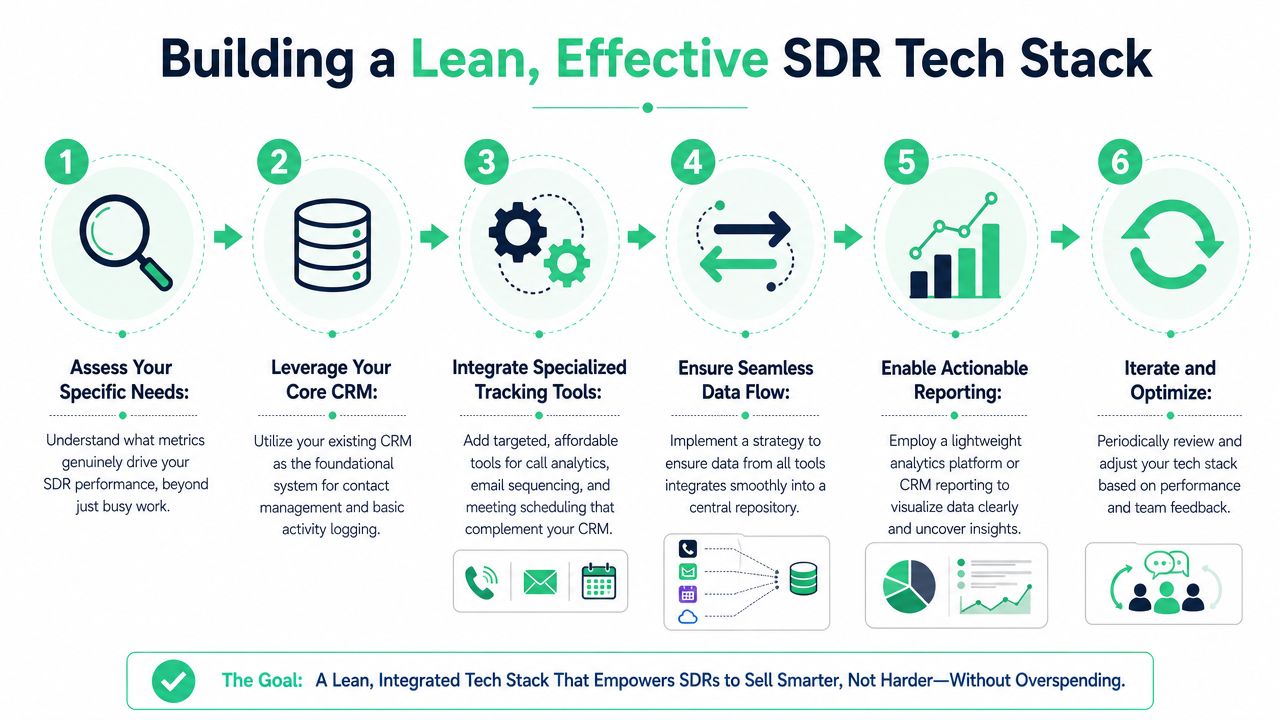
If a rep has to remember to enter every call, email, and meeting by hand, your data will decay almost immediately. Not because reps are evil. Because they're busy, distracted, and rightly focused on selling instead of playing CRM typist.
A lean stack usually needs three layers.
CRM as source of truth
Salesforce, HubSpot, Pipedrive. Pick one and make it the system of record for contacts, accounts, opportunities, and core reporting.
Sales engagement layer
Outreach or Salesloft if you need structured sequences, task flows, and multi-touch outbound motion.
Conversation and call visibility
Gong is the heavyweight example. For smaller teams, even a simpler calling and recording setup can do the job if it captures data cleanly.
That's enough for many teams to operate well. You do not need twelve overlapping tools and a RevOps therapist.
The point of the stack is not feature accumulation. It's friction removal.
Monday's write-up on sales tracking reports that organizations using automated CRM data capture and live dashboards reduce pipeline surprises by 30% and improve forecast accuracy by 25%. That's why automation matters. It protects the integrity of the system.
Here's what I'd prioritize in buying order:
Not every team needs Outreach and Gong on day one. A startup can run lean with HubSpot, a dialer, and a scheduler if the data flows properly.
If you're comparing options for phone visibility, this roundup of best call tracking software is a decent place to start. Just don't buy based on the prettiest homepage. Buy based on whether the tool logs activity automatically, syncs reliably, and gives managers context they can coach from.
My bias: If a tool creates more admin than insight, it's not part of your stack. It's part of your problem.
I'd rather have a boring stack with clean data than an exciting stack with broken sync.
A lot of teams overpay for tools while underinvesting in setup. They connect the CRM, but not properly. They log calls, but not outcomes. They record meetings, but don't map them to opportunities. Then they act shocked when the dashboard lies.
Your stack should answer three questions without rep interpretation:
If your tools can't support that, keep simplifying until they can.
Monday morning. The leadership team sees a dashboard full of green. Activity is up, meetings are booked, the SDR manager looks relieved. Two weeks later, half that pipeline is dead on arrival because nothing progressed.
That happens when a dashboard rewards motion instead of movement.
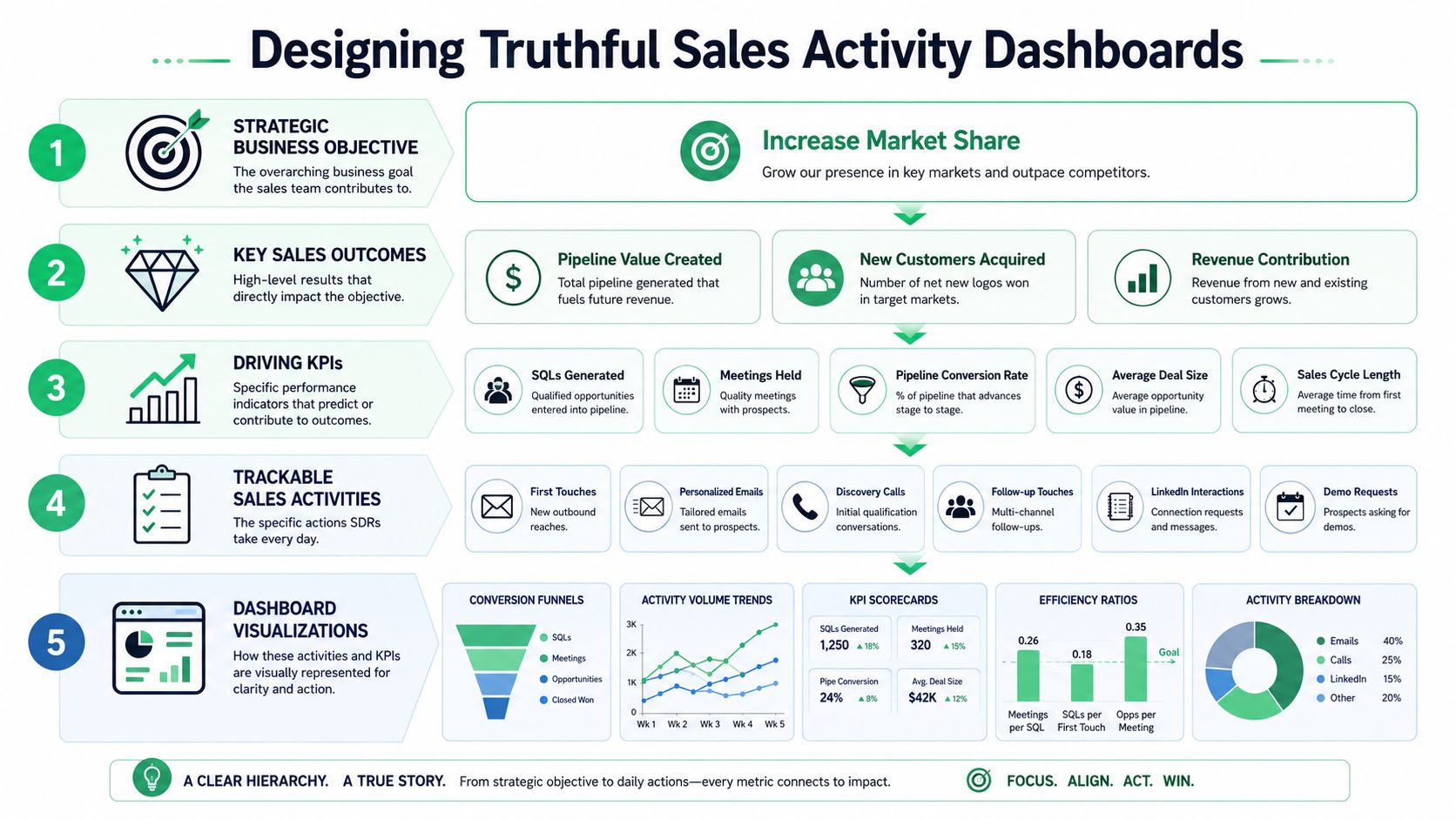
A good dashboard does one job. It helps one person make one better decision. The second it tries to please reps, managers, and executives in the same view, it turns into wall art.
A rep dashboard should answer a simple question. Where should I spend the next two hours?
I want reps looking at deals and accounts that can still move, not admiring yesterday's hustle. That means showing:
You'll notice what's missing. Raw email count. Task count. Giant talk-time trophies.
Reps do not need a cockpit with 40 widgets. They need a short list that helps them rescue stalled deals, prepare for live conversations, and push real opportunities forward.
Manager dashboards exist for diagnosis.
If one rep books plenty of meetings but very few become qualified opportunities, the problem is not effort. It is targeting, qualification, messaging, or call quality. Your dashboard should make that obvious fast.
I'd track this:
| What the manager should monitor | Why it matters |
|---|---|
| Meetings booked by stakeholder quality | Separates calendar filler from real buying potential |
| Meeting-to-opportunity conversion | Exposes weak discovery and weak qualification |
| Opportunity-to-next-stage conversion | Shows whether first meetings create momentum or stall out |
| Stalled opportunities by owner | Identifies deals that need coaching or intervention |
| Buyer engagement across contacts | Shows whether reps are building multi-threaded deals |
Qualification rules need to be tight or the whole view gets polluted. If your team still debates what counts as qualified, fix that before you obsess over dashboard design. This breakdown to compare BANT, MEDDIC, and CHAMP is a useful starting point.
Leadership needs fewer charts and better filters.
The executive view should answer three questions. Is pipeline progressing? Is it progressing at the right rate? Can we trust what reps are calling qualified?
That means the top row should focus on stage conversion, stage aging, win rate by source, and the share of opportunities with real buyer engagement. If those numbers are weak, a mountain of calls and emails does not save you. It just means the team stayed busy while pipeline got softer.
A pipeline stuffed with first meetings and thin follow-through is not healthy. It is expensive theater.
One more rule. Leadership dashboards should separate created pipeline from progressing pipeline. Combining those into one neat number obscures the underlying issue. Plenty of teams are good at generating opportunities. Far fewer are good at getting those opportunities to the next serious buying step.
Build every dashboard from outcome to cause to action.
Start with the business result. Then show the conversion points that explain it. Then show the work that can improve it. If a manager has to click through six charts to figure out why stage two is clogged, the dashboard failed.
Vanity metrics still have a place, but only in the basement. Calls, emails, and meetings are supporting context. They are not the headline unless they connect directly to reply rate, qualification rate, stage progression, or revenue.
If your dashboard makes busy reps look successful while deals sit still, the dashboard is lying. Fix that first.
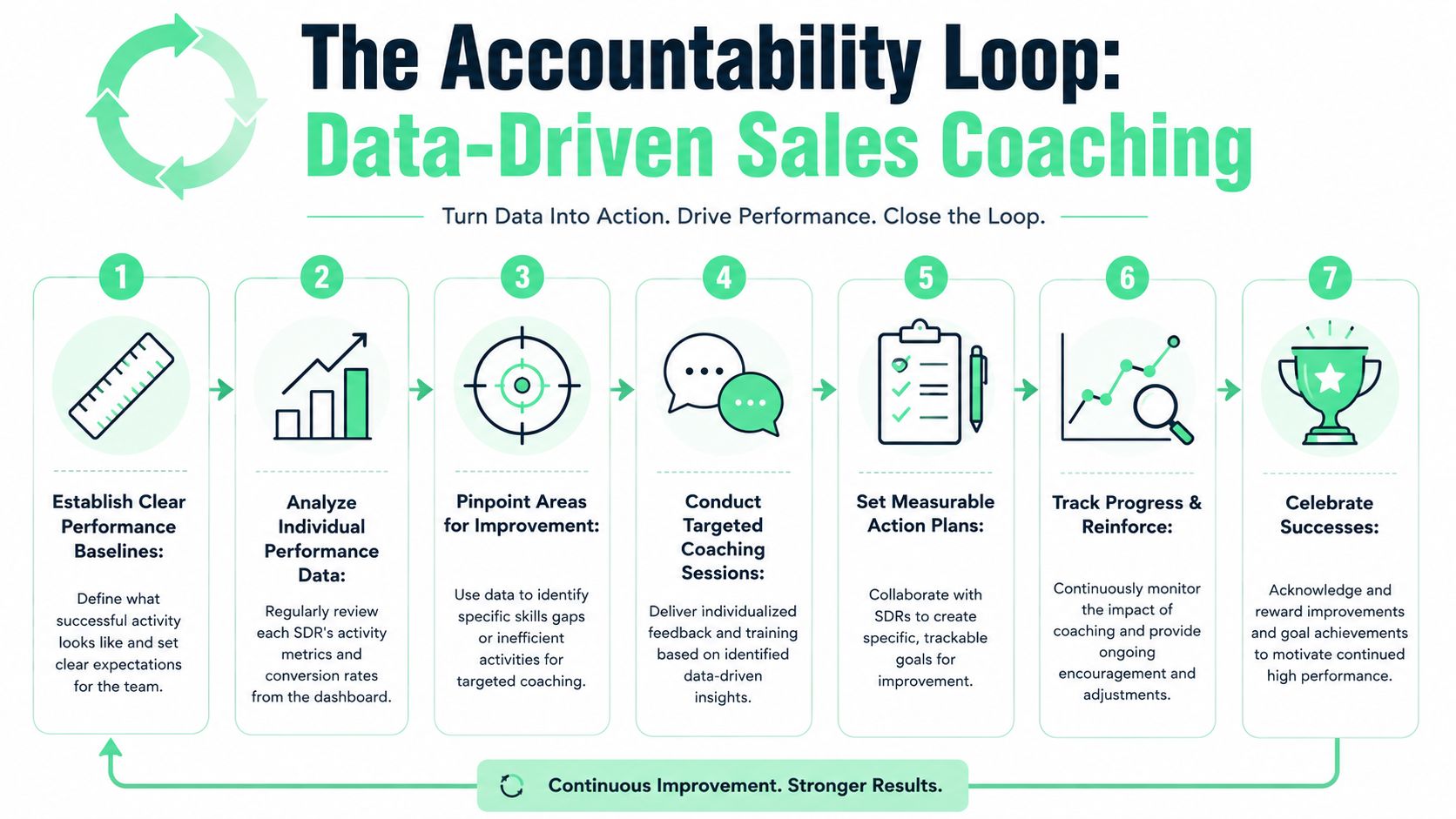
Data doesn't improve performance. Managers do.
That's the part teams forget when they invest in sales activity tracking. They build the reports, schedule the syncs, and then use the dashboard like a scoreboard instead of a coaching tool. That's backwards.
Let's say you've got an SDR named Maya. She's active, responsive, and popular internally because she updates everything on time. Lovely. Her pipeline output still lags.
A bad manager says, “You need to work harder.”
A useful manager looks at the data and says, “Your outreach volume is fine. Your meetings are lower quality than the rest of the team, and your opportunities aren't progressing after the first conversation. Let's inspect that.”
That's a real coaching conversation. Specific. Fair. Fixable.
Use the same sequence each week so reps know the process and don't feel ambushed.
Ratio-based thinking beats generic activity reports. Weflow's sales activity tracking guide gives a sharp example. In SaaS, the average activity-to-close ratio is often 450 activities per deal. If a rep hits 50 calls a day but only closes 1 deal a month, they are missing 400 other required touches. That gap is coachable.
Maybe the rep is ending sequences too early. Maybe they're not multi-threading. Maybe they're getting surface-level interest and mistaking it for momentum.
Manager move: Don't ask “Did you do enough activity?” Ask “Which touches created progression, and which ones were just motion?”
That question changes everything.
Good reps hate meaningless oversight as much as bad reps do. If your tracking system feels punitive, adoption will crater and your data quality will follow.
So frame accountability properly:
That creates trust. The dashboard is no longer a weapon. It's a shared reference point for getting better.
And yes, celebrate improvement. If a rep starts reaching better stakeholders, running cleaner discovery, or converting more first meetings, say it out loud. Teams repeat what leaders notice.
Monday morning. The dashboard says your team made plenty of calls, sent plenty of emails, and booked a decent number of meetings. Friday arrives and pipeline still feels thin, deals still stall after first touch, and every forecast call turns into detective work.
That happens when you track motion instead of progression.
Your first 30 days should build one habit. Measure the steps that push deals forward, then coach against those steps every week. Skip the grand redesign. You do not need a quarter-long ops project. You need a simple operating rhythm the team will follow.
Week 1
Choose three metrics and force discipline around them. One top-of-funnel input, one quality check, and one progression metric tied to deal movement.
A practical setup looks like this:
That third metric matters most. Activity tells you who stayed busy. Progression tells you whether the work had teeth.
Week 2
Fix the ugliest tracking gap in your stack. Start where reps lose time or where managers lose trust.
If calls, emails, meetings, or opportunity updates still depend on manual entry, clean that up first. Reps should spend their energy on selling, not feeding a CRM that behaves like a tax form.
Week 3
Build one dashboard. Only one.
Make it a manager dashboard built around stage movement, conversion rates, and stalled deals by rep. Include activity only as supporting context. Decorative charts are how teams hide from the truth.
Week 4
Run two sharp 1:1s using the dashboard. Pick one rep who consistently moves deals and one who creates noise without enough pipeline movement.
Look for pattern gaps:
That comparison gives you coaching material you can use right away.
Boring systems scale. Fancy ones die in week two.
Use a short checklist:
Track enough to coach. Not so much that everyone drowns in admin.
One warning. Better tracking will not save a weak team. It will just expose the problem faster, which is still useful. If you are fixing process and headcount at the same time, HireSDR can help you rebuild the bench while you tighten the system.
Most advice about the difference between inbound and outbound sales is technically correct and practically useless. Yes, inbound is pull and outbound is push. Wonderful....

Your CRM is open. The dashboard looks busy enough to fool you for a minute, but the pipeline tells the truth. A few stale opportunities....

Another “Fully Vetted” candidate who can't find the cafeteria? You've been there. The resume looked perfect. The recruiter swore they were a unicorn. Three weeks...
Tell us who you need. We'll have pre-vetted candidates in your inbox within 72 hours. No commitment until you hire.